
Flights
JetBlue Travel Bank Guide: Expiration, Login, How to Use It

The JetBlue Travel Bank is the account that holds your JetBlue travel credits. Cancel a nonrefundable ticket or rebook one at a lower fare, and the money comes back here, not to your card. You spend it at checkout on jetblue.com or in the app.
JetBlue now calls the program travel credits and your balance a travel credit account. Travel Bank is what people still search for. This guide uses both.
Three things changed in 2026: the fare lineup was rebuilt in late July 2026, the separate Travel Bank login was retired, and delay compensation now pays in TrueBlue points. Here is the current version, as of August 2026.
What is the JetBlue Travel Bank?
An online account holding stored value: a wallet you spend on JetBlue flights, on jetblue.com or the app. Not a credit card, not a points balance. Dollars from tickets you already paid for.
You do not open one. If a credit is issued to an email with no account attached, JetBlue creates it and sends a password link from no-reply@accounts.jetblue.com that expires in 30 days.
What changed for JetBlue travel credits in 2026?
Three changes that guides written before this summer get wrong.
| What changed | The rule as of August 2026 | When |
|---|---|---|
| Fare lineup and fees | Blue and Blue Basic retired. Pick a cabin (Main, EvenMore, Mint, BlueFirst later in 2026), then a tier: Base ($150 to change, $150 to cancel), Standard (no fee, cancels to credit), Flex (refunds to original payment) | Late July 2026 |
| Delay compensation | Paid in TrueBlue points, not credit, and needs a TrueBlue account on the reservation before departure | Early 2026 |
| Travel Bank login | The separate portal is retired. Credits live in your regular jetblue.com account | Live now |
Bookings made before the switch keep their original terms, so a Blue Basic ticket from June still plays by the old rules (jetblue.com).
How do you get JetBlue travel credits?
Four routes: canceling a nonrefundable ticket, rebooking a flight whose price fell, canceling an award ticket, and, until this year, delay compensation. Award cancellations send the taxes back as credit, travelers report, though JetBlue does not document it.
Canceling a nonrefundable fare
| Fare (as of August 2026) | Cancel fee | Where the money goes |
|---|---|---|
| Base | $150 per person | Travel credit, minus the fee |
| Standard (Main, EvenMore, Mint) | None | Travel credit, full fare |
| Flex | None | Original payment, so nothing reaches Travel Bank |
| Legacy Blue Basic | $100 in the US, Caribbean, Mexico and Central America; $200 elsewhere | Credit, minus the fee |
| Legacy Blue, Blue Plus, Blue Extra, Mint | None | Travel credit, full fare |
Fee amounts sit on JetBlue's fees page (jetblue.com). Credit generally lands as soon as the cancellation goes through. Agency bookings take longer: call if nothing shows after seven days.
Delays and cancellations now pay in TrueBlue points
Compensation for controllable delays used to land in Travel Bank and could take seven days to post. Since early 2026 JetBlue pays it in TrueBlue points, and your TrueBlue account has to be on the reservation before departure (jetblue.com), where the amounts are published. JetBlue has never said how the points compare to the credit they replace.
What happens when your JetBlue fare drops after booking?
You claim the difference, and this is the most useful thing to know about Travel Bank. On any fare without a change fee, changing to a lower fare returns the difference as travel credit rather than a refund to your card, which is the whole mechanic behind a JetBlue price drop.
Sign in first
Open jetblue.com or the app. Phone and chat add a $25 per person fee.Manage Trips, then Change flight
Pick Change flight, not Cancel. On a no-fee fare, looking is free.Search the same flight first
Same route, same date. JetBlue documents the policy but not this exact maneuver, and travelers report mixed results with it, so if the flight you already hold will not reprice, cancel and rebook instead.Confirm
If today's fare is lower, the difference posts to Travel Bank on the original clock.
JetBlue publishes no walkthrough, so that flow is what experienced flyers document, most thoroughly in FlyerTalk's rebooking threads. Some hit error EC00002 on desktop and complete the same change in the app. Others cancel and rebook, risking the seat and the fare in between.
Is chasing a JetBlue price drop worth it? The fee math
Only if the drop clears the fee, which as of August 2026 makes this a two-tier program.
| Your fare | Cost to capture the drop | Worth doing when |
|---|---|---|
| Standard (Main, EvenMore, Mint) | $0 change fee | Any drop pays |
| Flex | $0 change fee | Any drop pays, and Flex refunds to original payment |
| Base | $150 to change, $150 to cancel | Only when the drop clears $150 |
| Legacy Blue Basic | Changes not permitted; canceling costs $100 or $200 by route | Only when the drop clears that fee |
Points bookings are cleanest: changes are free and the points difference redeposits automatically, which repricing guides document even though JetBlue does not. Promo-code bookings are messiest: capturing a drop means canceling and rebooking, and the promo rarely reapplies.
Just booked? The first 24 hours run on their own rules. See our 24-hour flight cancellation rule guide. Every airline does a version of this, and we keep guides for United repricing, Southwest price drops, and Delta eCredits.
A drop can appear and vanish before you next think to check a flight you already booked. Autopilot tracks the reservation after you book, reprices it when the price falls, and the difference lands in your Travel Bank. Adding a trip takes a confirmation code and about ten seconds, and Autopilot charges 25% of what it finds you, nothing otherwise.
When do JetBlue travel credits expire?
Twelve months from the original ticketing date of the ticket that created it. Not the day you canceled, not the day the credit appeared, not the day you fly. JetBlue's refunds page says travel credit is "valid for 12 months from original ticketing date" (jetblue.com).
12 months
Cancel a ticket in month ten and you hold two months of credit, not twelve. That is the program's most expensive misunderstanding. The rule dates to March 8, 2023, so older guides describe a friendlier clock.
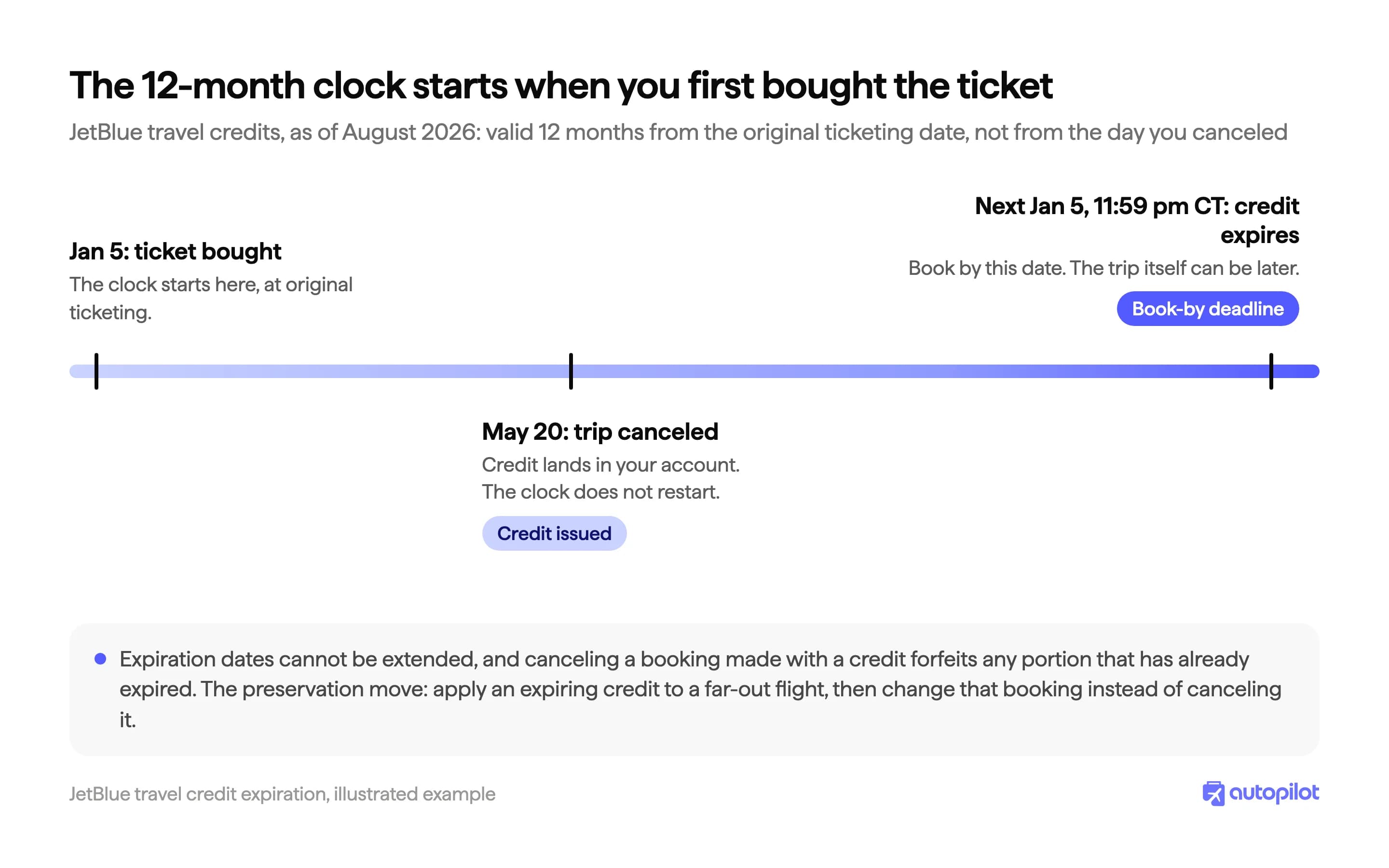
Apply the credit to a booking by that date and the trip can be months later. Credits die at 11:59 pm Central, each carries its own date on the Travel Credit Statement, and JetBlue spends the oldest-expiring one first.
Can you extend a JetBlue travel credit?
No. JetBlue states that credits and their expiration dates cannot be extended, and agents stopped granting pandemic-era exceptions years ago. Booking with a credit and then cancelling does not restart the clock, because the credit returns with its original expiration date.
JetBlue Travel Bank login: what changed
There is no Travel Bank login any more. For years it had a separate portal with its own member ID and a mailed temporary password. Visit that address today and it points you to jetblue.com.
Sign in with your regular jetblue.com account instead, and your credits sit under the profile icon, top right. The old portal still turns up in search results, which is why people land there and assume their JetBlue flight credit vanished.
Your credit is not showing up? Check which email received it
The usual cause is an unlinked account: the credit went to an email that is not on your TrueBlue profile. Sign in with the address that received the welcome message, or ask JetBlue to link the accounts.
Accounts cannot be merged when names or dates of birth differ, so credits stay under whichever identity received them. Agency bookings post slower: wait seven days before escalating.
How to check your JetBlue Travel Bank balance
- Sign in at jetblue.com or the app.
- Click your initials or profile picture, top right. Your total credit appears under your name.
- Choose See Travel Credit Statement for the ledger: every credit, its amount, and its expiration date.
Check the statement, not the total. A balance can hide that half of it expires in six weeks.
How to use JetBlue Travel Bank credits at checkout
Sign in before you search, because the credit is attached to your account. At the payment step, apply the credit, adjust how much to spend, and settle the rest with a card. Leftovers keep their original expiration date.
Two forms of payment: what you can and cannot combine
This is the most common complaint about the program, and the phrase to know is two forms of payment. A booking accepts two, and credit is one of them.
- Credit plus one card: works. Apply the credit, then put the rest on the card.
- Credit plus TrueBlue points: works. JetBlue's points-redemption page uses this example.
- Credit plus points plus a card: no. That is three forms, and the cap is two.
- Two credit accounts on one booking: no. Book separately from each.
Which is why small balances feel stuck. On an award ticket, points and credit fill both slots, so a credit that will not cover the taxes leaves no room for a card. Award taxes can come from credit, down to the $5.60 security fee.
Can you transfer JetBlue travel credit to another person?
No. Credits cannot be transferred between accounts, whatever resale listings suggest. You can spend yours on someone else, though: there is no name lock at booking. You can buy a ticket for someone, but you cannot hand them the credit.
What JetBlue travel credit cannot pay for
Credit buys airfare and taxes on flights booked on jetblue.com or in the app, including partner-marketed flights sold through JetBlue, plus the air portion of a Vacations package. As of August 2026, it does not touch (jetblue.com):
- Checked bags
- Seat fees of any kind: Main Base selection, EvenMore, extra legroom, preferred
- Same-day switches and priority security
- Pet fees, the unaccompanied minor fee, and the $25 per person phone or chat charge
- Taxes on a Move to Mint certificate (Mosaic 3 and 4)
- The non-air portion of a Vacations package, or any package with partner-airline flights
- Anything booked away from JetBlue, including agency and airline sites
Which answers a common question: no, you cannot spend JetBlue travel credit on American Airlines, or anything booked away from JetBlue.
JetBlue Vacations credits are a different instrument
Cancel a JetBlue Vacations package and you get a JetBlue Vacations Credit. It is not a Travel Bank credit and will not show in your travel credit balance.
- Phone-only redemption through JetBlue Vacations, with your confirmation code and the last four digits of the card.
- It covers the whole package, not just the flight. Travel Bank credit cannot.
- It is fully transferable to anyone the holder authorizes. Travel Bank credit is not.
- Book by the expiration date, travel later. Not extendable, and JetBlue does not publish how long they last.
The redemption line and current terms live on JetBlue's jetbluevacations.com credits page. Holding both kinds? Spend them separately.
JetBlue is mid-rebuild: new fare names, a new compensation currency, one less login. The part that pays has not changed. On any fare without a change fee, a price that falls after you book is money you are owed, sitting there whether or not you ask. Other airlines do the same with different fine print, mapped in our flight repricing guide.
Frequently asked questions
The Autopilot Crew
Keep reading
How to Rebook a Flight for Less When the Fare Drops
Fares move after you book. How to rebook a flight for less, what each airline returns as credit or refund, and the order that protects your seat.
United Cancellation Policy 2026: Change, Cancel, Refund
United's cancellation policy in 2026 by fare type: when a change is free, when Basic Economy can still be cancelled, and how fast a refund comes back.

American Airlines Refund: How to Get Your Money Back (2026)
How to request an American Airlines refund at aa.com/refunds, one per ticket number, plus who actually qualifies and how long the money takes to land.